> For the complete documentation index, see [llms.txt](https://docs.nedyx.com/llms.txt). Markdown versions of documentation pages are available by appending `.md` to page URLs; this page is available as [Markdown](https://docs.nedyx.com/version-1.52-preview/clearlines-functions/text-functions/createmember.md).
# CREATEMEMBER
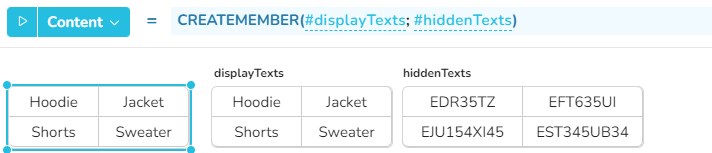
Returns a value containing two texts - the display text and a hidden text.
#### Syntax
**CREATEMEMBER**(*displayText*; *hiddenText*)
* *displayText* - the text which will be displayed for the value - ***Value type**: text*
* *hiddenText* - an invisible text which is not displayed - ***Value type**: text*
#### Remarks
* The value type *member is* helpful if additional information should be stored for a value. E.g. the values of a menu widget can contain members with region names as displayText and the according region id as *hiddenText*. When the user selects a region, the *hiddenText* can be used e.g. to restrict the database request based on the region id.
* The function HIDDENTEXT can be used to access the *hiddenText* of a member value.
#### Examples
CREATEMEMBER with multiple cells of table widgets: