> For the complete documentation index, see [llms.txt](https://docs.nedyx.com/llms.txt). Markdown versions of documentation pages are available by appending `.md` to page URLs; this page is available as [Markdown](https://docs.nedyx.com/version-1.52-preview/clearlines-functions/text-functions/htmltojsontext.md).
# HTMLTOJSONTEXT
Converts a HTML text to a JSON text which can be assigned to formatted text widgets.
#### Syntax
**HTMLTOJSONTEXT**(*htmlText*)
* *htmlText* - html-formatted text which should be converted to the json text which can be used in a text widget - ***Value type**: text*
#### Remarks
* If it is not possible to convert *htmlText* to json, the function returns the *htmlText* as unformatted text (see example 3 below).
#### Examples
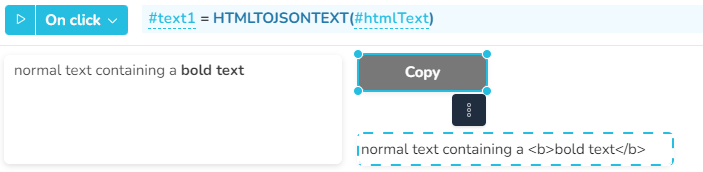
In this example, a click on th e Copy button converts the html text from the dotted widget into a json text, by using the HTMLTOJSONTEXT function. The result is then assigned to the text widget on the left, where it is displayed as a formatted text.