> For the complete documentation index, see [llms.txt](https://docs.nedyx.com/llms.txt). Markdown versions of documentation pages are available by appending `.md` to page URLs; this page is available as [Markdown](https://docs.nedyx.com/version-1.83-de/nedyx/clearlines-funktionen/bereichs-funktionen/transpose.md).
# TRANSPOSE
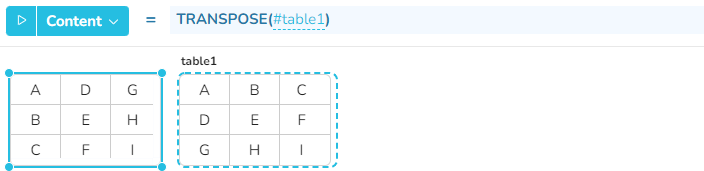
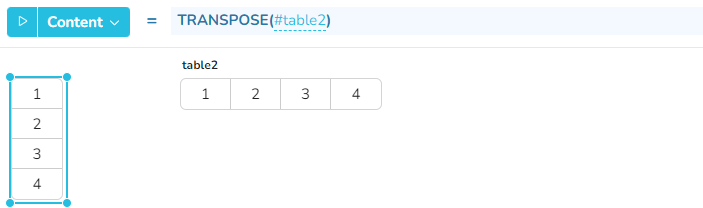
Gibt einen Bereich mit ausgetauschten Zeilen und Spalten zurück.
#### Syntax
**TRANSPOSE**(*range*)
* *range* - der Bereich, der transponiert werden soll - ***Wertetyp**: Bereich*
#### Bemerkungen
* Die Funktion tauscht die Zeilen- und Spaltenkoordinaten der Zellen. So wird ein Wert, der in Zeile 3 und Spalte 5 stand, anschließend in Zeile 5 und Spalte 3 stehen.
#### Beispiel