> For the complete documentation index, see [llms.txt](https://docs.nedyx.com/llms.txt). Markdown versions of documentation pages are available by appending `.md` to page URLs; this page is available as [Markdown](https://docs.nedyx.com/version-1.66/nedyx/working-with-nedyx/widgets/widget-selection.md).
# Widget selection
#### General
In Edit mode, widget properties can be changed in the tabs on the right or by the widget toolbar.\ 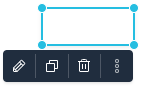 It is possible to select multiple widgets at once. Only one of these widgets is the *main selected widget*, identified by resize circles at the four corners.
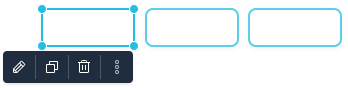 The main selected widget has some specific characteristics, e.g. only this widget can be resized.
#### Widget selection
Single widgets are selected by just clicking on them.
Multiple widgets can be selected by
* holding the **Shift** or the **CTRL** key pressed during the selection process. An additional click deselects a selected widget.
* dragging a rectangle around widgets by using drag & drop within the page.
* **CTRL**+**a** selects all widgets of a page.
Within a selection of multiple widgets, the main selected widget can be changed by
* clicking two times on a selected widget with holding the **Shift** or **CTRL** key pressed.
* typing on tab or **Shift**+**tab**. This changes the main selected widget within the selection to one or the opposite direction.
The main selected widget has some specific characteristics, e.g. only this widget can be resized.
#### Widget selection
Single widgets are selected by just clicking on them.
Multiple widgets can be selected by
* holding the **Shift** or the **CTRL** key pressed during the selection process. An additional click deselects a selected widget.
* dragging a rectangle around widgets by using drag & drop within the page.
* **CTRL**+**a** selects all widgets of a page.
Within a selection of multiple widgets, the main selected widget can be changed by
* clicking two times on a selected widget with holding the **Shift** or **CTRL** key pressed.
* typing on tab or **Shift**+**tab**. This changes the main selected widget within the selection to one or the opposite direction.