> For the complete documentation index, see [llms.txt](https://docs.nedyx.com/llms.txt). Markdown versions of documentation pages are available by appending `.md` to page URLs; this page is available as [Markdown](https://docs.nedyx.com/version-1.66/nedyx/working-with-nedyx/apps.md).
# Apps
The starting point in nedyx is the **My Apps** screen. Here all apps are listed which are shared with you.

Depending on your permission role, you have different options here.
* If you are a *Standard* user, you are able to open apps.
* If you are a *Contributor*, you can in addition create new apps, edit app properties, duplicate and delete apps.
* If you are an *Admin*, you can in addition see all apps in your workspace.
### Options
#### Add new app 
This adds a new app to your workspace. By default, you have *Editor* permissions on this app, so you can e.g. edit this app and share it with others.
**Note**: If the user does not share the app, there is no way for another user to open this app, not even for *Admins*.
#### Import app 
You can create a new app by clicking on **Import app**. This lets you upload an app file from your local machine which has been previously created from an existing app.
If an app with the same name already exists, you can decide to replace the existing app, or to create a new app instead.

After the app import, the current user is the only shared user of the app.
#### Open app
An app can be opened by clicking on it.
### Further options
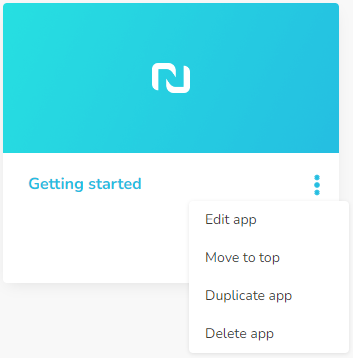
If you hover over an app, you see a three dots menu, which provides additional options.
#### Edit app
In the **Edit App** dialog, you can define and change properties of your app, like the name and a description. In addition, you can upload an image which will be displayed for the app.

#### Move to top
This command moves the app to the top of the app list.
In addition, the position of apps can be changed by drag & drop.
#### Duplicate app
This command creates an exact duplicate of your app.
#### Delete app
Deletes the app. A confirmation dialog is displayed to ensure that you really want to delete the app.

If you are unsure, it is recommended to export an app file before deleting an app.
#### Show all apps  This option is only available for *Admins*. It is for example helpful in the case that the last editor of an app is no longer available. Then it provides the admin of the workspace the ability to delete this app.
Apps, which can not be opened by the admin, are marked with a lock symbol. 
This option is only available for *Admins*. It is for example helpful in the case that the last editor of an app is no longer available. Then it provides the admin of the workspace the ability to delete this app.
Apps, which can not be opened by the admin, are marked with a lock symbol.