> For the complete documentation index, see [llms.txt](https://docs.nedyx.com/llms.txt). Markdown versions of documentation pages are available by appending `.md` to page URLs; this page is available as [Markdown](https://docs.nedyx.com/version-1.66/nedyx/getting-started/widget-references-across-pages.md).
# Widget references across pages
1. Open the page *Calculator*.
2. Select the four table widgets on the left, e.g. by clicking on the widgets with holding the *Shift* key pressed.

3\. Type on the *Del* key to delete these widgets.
Now the remaining table widget displays the error *!REFERENCE*, because its Content formula still contains references to the deleted widgets. For this widget, if you click on the "Execute formula" button  , the incorrect position is also indicated in the formula editor by a red underline and a tooltip:
4. Replace the current formula of the table widget with this formula:
**COMBINE**(#Page1.year; #Page1.contribution; #Page1.totalValue; #Page1.growth; *horizontal*)
**Note**: The new formula uses now the widget content of the other page. For this, the page name is inserted before the widget name, separated with a dot "."
5. Select the table widget and its heading widget by clicking on them, holding down the *CTRL* key.
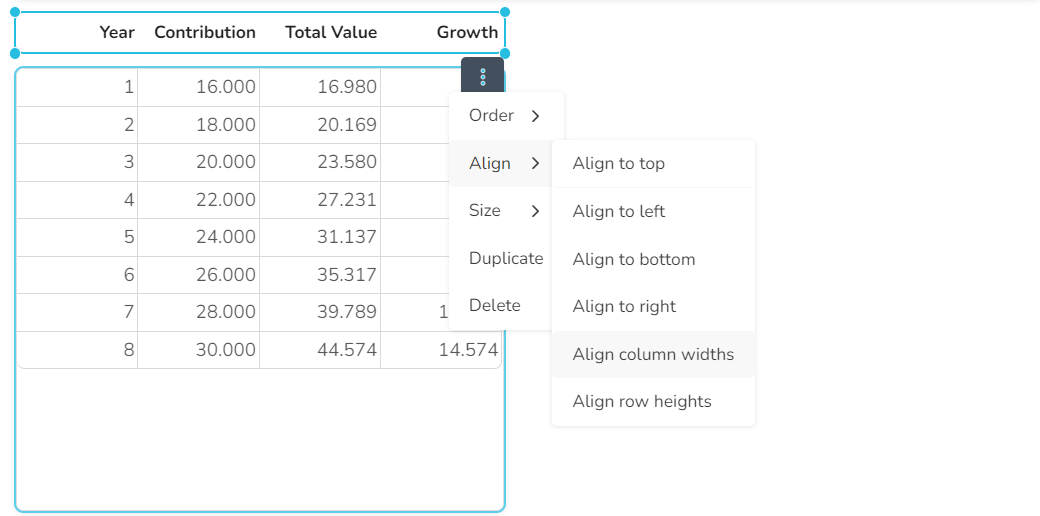
6. Press the *Tab* key, so that the 3-dot menu for the heading widget is displayed.
7. Click on the 3-dot menu and select **Size / Apply same width**, **Align / Align to left** and **Align / Align column widths** one after the other.
The two widgets are now aligned with each other.
In the next step, we display the data in a chart widget.