> For the complete documentation index, see [llms.txt](https://docs.nedyx.com/llms.txt). Markdown versions of documentation pages are available by appending `.md` to page URLs; this page is available as [Markdown](https://docs.nedyx.com/version-1.66/nedyx/clearlines-functions/text-functions/substitute.md).
# SUBSTITUTE
Replaces sub-texts in a text.
#### Syntax
**SUBSTITUTE**(*text*; *oldText*; *newText; option*)
* *text* - the text in which to search for oldText - ***Value type**: text*
* *oldText* - the text which is to be found in parameter text - ***Value type**: text*
* *newText* - the text with which *oldText* should be replaced- ***Value type**: text*
* *option* - defines if the substitution should be done with a regular expression - ***Value type**: constant (optional, default: empty - i.e. plain text replacement)*
Possible values are
* *regex* - the replacement should be done using a regular expression for parameter *oldText*
#### Remarks
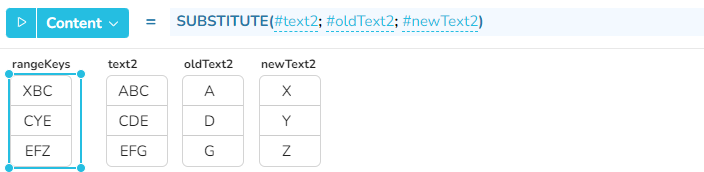
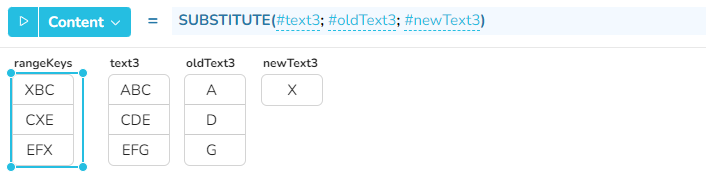
* The *text* parameter can also be a range with several texts. The SUBSTITUTE function is then applied to all these texts.
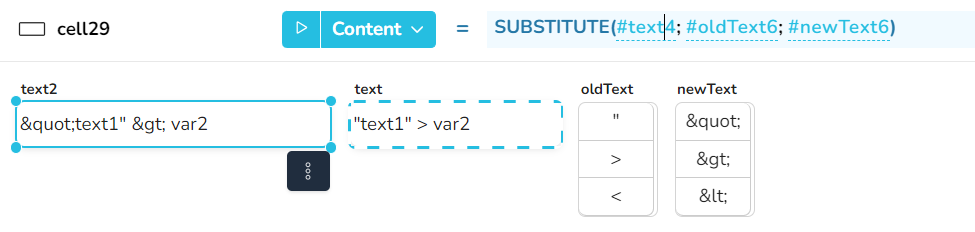
* For the parameters *oldText* and *newText*, column ranges can be specified. The text replacement then takes place one after the other (from top to bottom) for all text pairs of these two parameters.
* The search is performed case-sensitive, so the found text within parameter *text* must have the same casing than the parameter *oldText*.
#### Examples