> For the complete documentation index, see [llms.txt](https://docs.nedyx.com/llms.txt). Markdown versions of documentation pages are available by appending `.md` to page URLs; this page is available as [Markdown](https://docs.nedyx.com/version-1.66/nedyx/clearlines-functions/text-functions/hiddentext.md).
# HIDDENTEXT
Returns the hidden text of a member value.
#### Syntax
**HIDDENTEXT**(*member*)
* *member* - the *member* value, from which the hidden text should be returned - ***Value type**: member*
#### Remarks
* See the description of the function [CREATEMEMBER ](/version-1.66/nedyx/clearlines-functions/text-functions/createmember.md)to get more information about member value types.
#### Examples
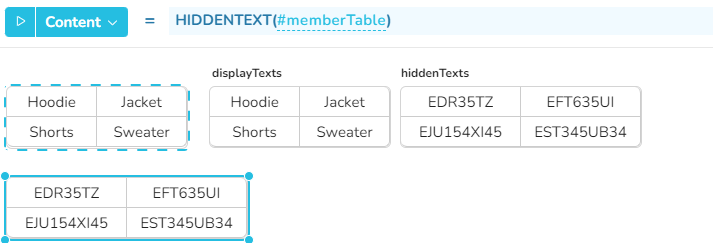
In this example, the *memberTable* has been created by the function CREATEMEMBER, based on the tables *displayTexts* and *hiddenTexts*. Then the function HIDDENTEXT can be used later to extract the hidden texts from *memberTable*.
**Content = ****HIDDENTEXT**(#memberTable)
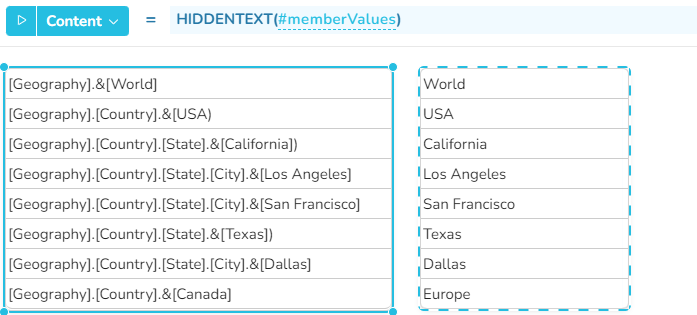
In this example, the HIDDENTEXT function returns the unique texts from dimension elements coming from Analysis Services.
**Content = ****HIDDENTEXT**(#memberValues)