> For the complete documentation index, see [llms.txt](https://docs.nedyx.com/llms.txt). Markdown versions of documentation pages are available by appending `.md` to page URLs; this page is available as [Markdown](https://docs.nedyx.com/version-1.66/nedyx/clearlines-functions/text-functions/code.md).
# CODE
Returns the Unicode value of a character.
#### Syntax
**CODE**(*character*)
* *character* - the character from which the Unicode value is to be returned - ***Value type**: text*
#### Remarks
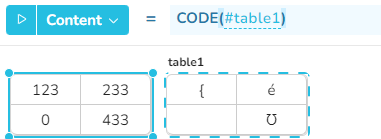
* If character is a text with several characters, only the Unicode value of the first character is returned.
#### Examples
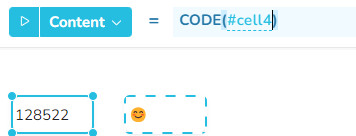
CODE with a single character:
**Content = ****CODE**(#cell1)
CODE with multiple characters:
**Content = ****CODE**(#table1)
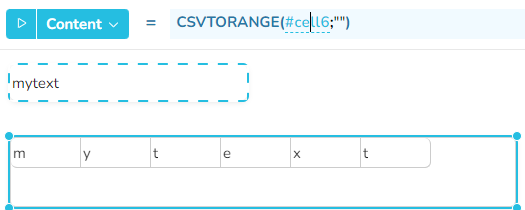
In combination with the CSVTORANGE function, you can determine all the Unicode values of a text.
In this case, the text *mytext* is first split into its individual letters using the CSVTORANGE function. The CODE function can then be applied to the individual cells.
**Content = ****CSVTORANGE**(#cell1;"")