> For the complete documentation index, see [llms.txt](https://docs.nedyx.com/llms.txt). Markdown versions of documentation pages are available by appending `.md` to page URLs; this page is available as [Markdown](https://docs.nedyx.com/version-1.66/nedyx/clearlines-functions/logical-functions/if.md).
# IF
Evaluates an expression if a corresponding condition is true.
#### Syntax
**IF**(*condition; thenExpression; elseExpression*)
* *condition* - the condition which is evaluated *- **Value type**: boolean*
* *thenExpression* - expression which is evaluated if *condition* is *true* - ***Value type**: any*
* *elseExpression* - expression which is evaluated if *condition* is *false - **Value type**: any (optional, default: empty)*
#### Return
The function returns the result of the evaluated *then*- or *elseExpression*.
#### Remarks
* The function can be called with multiple *condition*/*thenExpression* parameter pairs as well. In this case, the evaluation of the functions stops after the first condition which is *true*.\
If none of the conditions is true, *elseExpression* is evaluated.
#### Examples
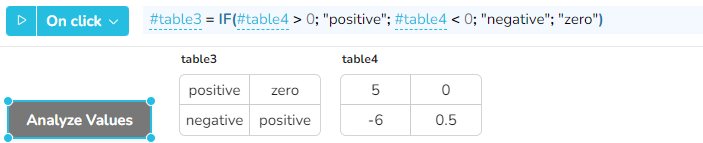
In this case, after clicking on the button, table3 is filled with the information if the values of table4 are positive, negative or zero.\
The IF function is used here with 5 parameter, and the result is used to fill a table widget.