> For the complete documentation index, see [llms.txt](https://docs.nedyx.com/llms.txt). Markdown versions of documentation pages are available by appending `.md` to page URLs; this page is available as [Markdown](https://docs.nedyx.com/version-1.66/nedyx/clearlines-functions/general-aspects/calculated-widget-properties/editable.md).
# Editable
The "Editable" property defines if the cells of a widget are editable.
#### Value
The Editable property is defined by boolean values. If the Editable formula returns true, the cell is editable, if it returns false, it is not editable.
#### Remarks
* This property is only applied in Live mode. In Edit mode, all cells of a widget are always editable.
* For table widgets, a range of boolean values can be used to define the Editable property for each cell. In that case,
* if a single cell is used, it defines the Editable properties of all cells
* if a row is used, the values define the Editable property for each according column
* if a column is used, the values define the Editable property for each according row
* if a range is used, the values define the Editable property for each according cell
#### Examples
The selected cell is editable, because the Editable formula returns *true* as value.
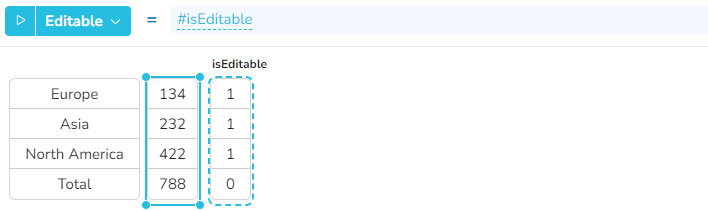
In this example, only the numbers of the continents should be editable, not the total number. Please note that instead of boolean value (true or false), the numbers 1 and 0 can be used instead.
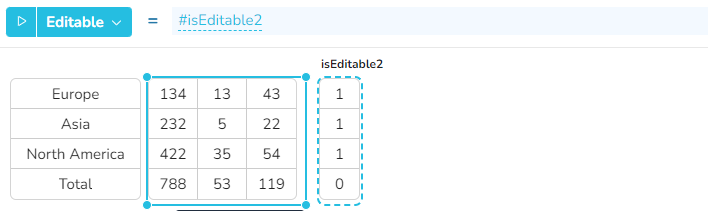
The column "isEditable2" defines that all cells in the rows of the continents are editable, but not the cells in the "Total" row.
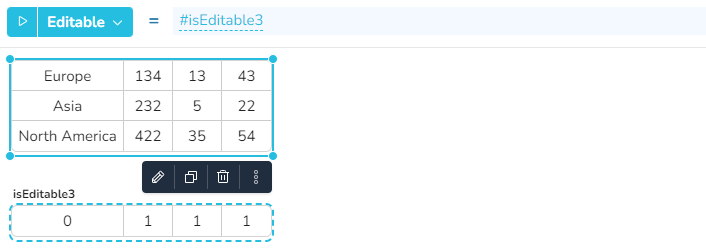
The row "isEditable3" defines that all cells in the continent column are not editable, but the values in the other columns.
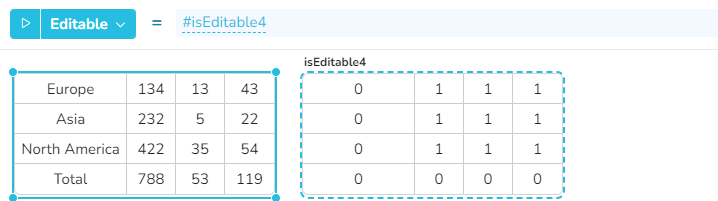
The range "isEditable4" defines that only the values of the continents are editable.