> For the complete documentation index, see [llms.txt](https://docs.nedyx.com/llms.txt). Markdown versions of documentation pages are available by appending `.md` to page URLs; this page is available as [Markdown](https://docs.nedyx.com/version-1.66-de/mit-nedyx-arbeiten/weitere-felder.md).
# Weitere Felder
#### Die "Add widget" Toolbar
Über die Symbolleiste "Widget hinzufügen" können Widgets zu einer Seite hinzugefügt werden. Weitere Informationen finden Sie im Kapitel [Adding widgets](/version-1.66-de/mit-nedyx-arbeiten/widgets/hinzufugen-von-widgets.md).
#### Das "Name" Feld (für Pages und Widgets)
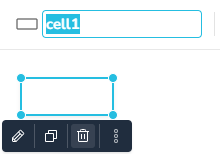
Im Feld "Name" wird der Name des aktuell ausgewählten Widgets angezeigt und kann geändert werden. Siehe Kapitel [Hinzufügen von Widgets](/version-1.66-de/mit-nedyx-arbeiten/widgets/hinzufugen-von-widgets.md) für weitere Informationen.