> For the complete documentation index, see [llms.txt](https://docs.nedyx.com/llms.txt). Markdown versions of documentation pages are available by appending `.md` to page URLs; this page is available as [Markdown](https://docs.nedyx.com/version-1.66-de/clearlines-funktionen/datenbank-funktionen/getstatement.md).
# GETSTATEMENT
Gibt die Anweisung (SQL, MDX oder REST URI) wie auf der Registerkarte Verbindung definiert zurück.
#### Syntax
**GETSTATEMENT**(W*idget*)
1. *Widget* - das Widget, von dem das aktuelle Statement zurückgegeben werden soll - ***Wertetyp**: Widget Referenz (optional; Standardwert: das aktuelle Widget)*
#### Bemerkungen
* Gibt die Anweisung als Text zurück, die von nedyx auf der Grundlage der aktuellen Einstellungen in dem Connection-Tab erstellt wird. Also das gleiche Statement, das beim Aufruf von GETDATA ohne Parameter an die Datenbank gesendet wird. Je nach Verbindungstyp liefert die Funktion unterschiedliche Statements zurück:
* SQL für ODBC-Verbindungstyp
* MDX für Analysis Services (SSAS), SAP MDX oder Essbase Verbindungstyp
* REST URI für OData oder Google Sheets Verbindungstyp
#### Beispiel
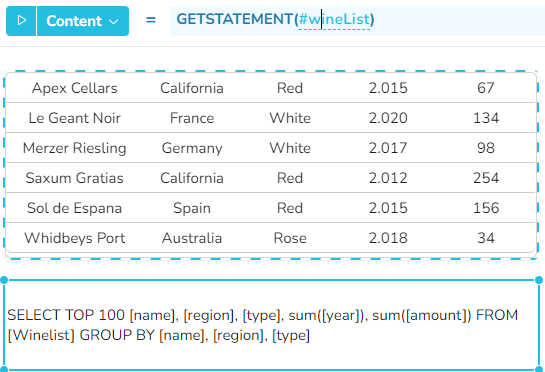
Die untere Zelle wird mithilfe der GETSTATEMENT Funktion mit der SELECT-Anweisung gefüllt, die für die obere Tabelle automatisch generiert wurde.