> For the complete documentation index, see [llms.txt](https://docs.nedyx.com/llms.txt). Markdown versions of documentation pages are available by appending `.md` to page URLs; this page is available as [Markdown](https://docs.nedyx.com/version-1.66-de/clearlines-funktionen/bereichs-funktionen/sort.md).
# SORT
Gibt einen Bereich zurück, der auf der Grundlage der Werte in einer oder mehreren Spalten sortiert ist.
#### Syntax
**SORT**(*range;* *sortColumn1;* *sortOrder1;* …; *sortColumnN;* *sortOrderN*)
* *range* - der Bereich, der sortiert werden soll - ***Wertetyp**: Bereich*
* *sortColumn1-N* - die Spalte, die zum Sortieren von *range* verwendet wird - ***Wertetyp**: Spaltenbereich*
* *sortOrder1-N* - die Sortierreihenfolge - ***Wertetyp**: Konstante*
* up - *range* wird aufsteigend sortiert
* down - *range* wird absteigend sortiert
#### Beispiel
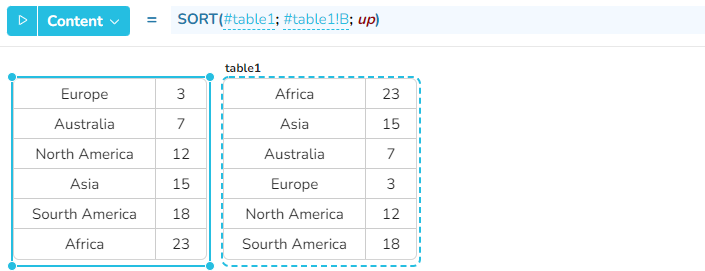
In diesem Beispiel gibt die Funktion SORT den Inhalt von table1 zurück, aufsteigend sortiert nach den Werten in der zweiten Spalte: