> For the complete documentation index, see [llms.txt](https://docs.nedyx.com/llms.txt). Markdown versions of documentation pages are available by appending `.md` to page URLs; this page is available as [Markdown](https://docs.nedyx.com/version-1.52-preview/working-with-nedyx/widgets/widget-selection.md).
# Widget selection
#### General
In Edit mode, widget properties can be changed in the tabs on the right or by the widget toolbar. \ 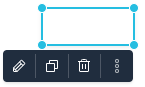 It is possible to select multiple widgets at once. Only one of these widgets is the *main selected widget*, identified by resize circles at the four corners.
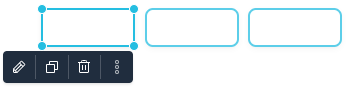 The main selected widget has some specific characteristics, e.g. only this widget can be resized.
#### Widget selection
Single widgets are selected by just clicking on them.
Multiple widgets can be selected by
* holding the **Shift** or the **CTRL** key pressed during the selection process. An additional click deselects a selected widget.
* dragging a rectangle around widgets by using drag & drop within the page.
* **CTRL**+**a** selects all widgets of a page.
Within a selection of multiple widgets, the main selected widget can be changed by
* clicking two times on a selected widget with holding the **Shift** or **CTRL** key pressed.
* typing on tab or **Shift**+**tab**. This changes the main selected widget within the selection to one or the opposite direction.
The main selected widget has some specific characteristics, e.g. only this widget can be resized.
#### Widget selection
Single widgets are selected by just clicking on them.
Multiple widgets can be selected by
* holding the **Shift** or the **CTRL** key pressed during the selection process. An additional click deselects a selected widget.
* dragging a rectangle around widgets by using drag & drop within the page.
* **CTRL**+**a** selects all widgets of a page.
Within a selection of multiple widgets, the main selected widget can be changed by
* clicking two times on a selected widget with holding the **Shift** or **CTRL** key pressed.
* typing on tab or **Shift**+**tab**. This changes the main selected widget within the selection to one or the opposite direction.