> For the complete documentation index, see [llms.txt](https://docs.nedyx.com/llms.txt). Markdown versions of documentation pages are available by appending `.md` to page URLs; this page is available as [Markdown](https://docs.nedyx.com/version-1.52-preview/clearlines-functions/logical-functions/if.md).
# IF
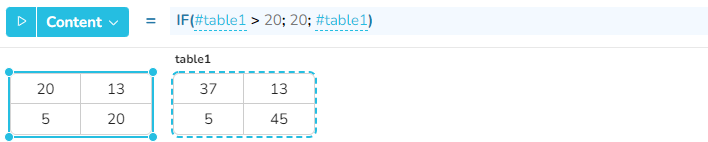
Evaluates an expression if a corresponding condition is true.
#### Syntax
**IF**(*condition; thenExpression; elseExpression*)
* *condition* - the condition which is evaluated *- **Value type**: boolean*
* *thenExpression* - expression which is evaluated if *condition* is *true* - ***Value type**: any*
* *elseExpression* - expression which is evaluated if *condition* is *false - **Value type**: any (optional, default: empty)*
#### Return
The function returns the result of the evaluated *then*- or *elseExpression*.
#### Remarks
* The function can be called with multiple *condition*/*thenExpression* parameter pairs as well. In this case, the evaluation of the functions stops after the first condition which is *true*.\
If none of the conditions is true, *elseExpression* is evaluated.
#### Examples
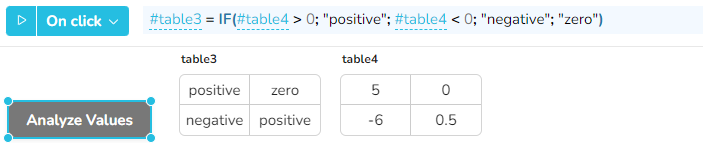
In this case, after clicking on the button, table3 is filled with the information if the values of table4 are positive, negative or zero. \
The IF function is used here with 5 parameter, and the result is used to fill a table widget.