> For the complete documentation index, see [llms.txt](https://docs.nedyx.com/llms.txt). Markdown versions of documentation pages are available by appending `.md` to page URLs; this page is available as [Markdown](https://docs.nedyx.com/version-1.52-preview/clearlines-functions/import-export-functions/sendemail.md).
# SENDEMAIL
Sends an email to one or more recipients.
#### Syntax
**SENDEMAIL**(*to*; *replyTo*; *subject*; *body*; *attachment;attachmentFileName*)
* *to* - address of the recipient - ***Value type**: text*
* *replyTo* - the reply-to address - ***Value type**: text*
* *subject* - the subject line of the email - ***Value type**: text*
* *body* - the body of the email - ***Value type**: text*
* *attachment -* the internal name of the file which should be attached to the email - ***Value type**: text (optional, default: empty - no file is attached)*
* *attachmentFileName -* the assigned name of the attached file - ***Value type**: text (optional, default: attachment, i.e. the internal file name is used as name of the attachment)*
#### Remarks
* The parameter *to* can be a column range containing a list of recipients.
* The parameter *attachment* must be the name of a file which has been generated on the nedyx server, including its extension (e.g. .pdf, .zip, ....
* The parameter *attachment* can be a column range containing a list of internal names of the files, which should be attached to the email.
* The parameter *attachmentFileName* can be a column range containing a list of names, which should be used for the according *attachment*.
#### Examples
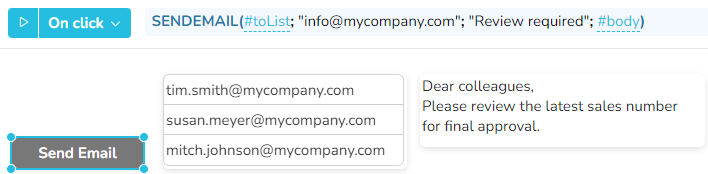
*Example 1* - SENDEMAIL without an attachment
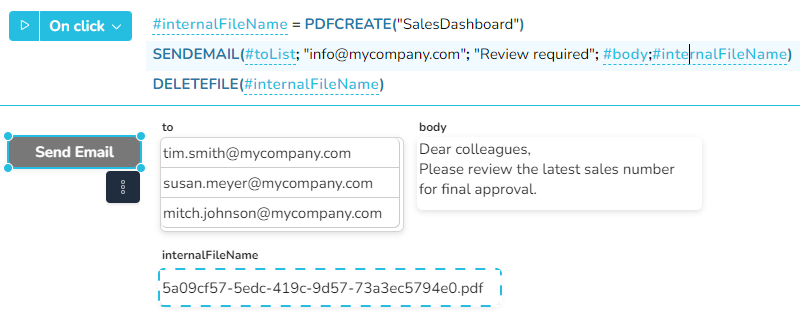
*Example 2* - SENDEMAIL with one attachment
In the next example, clicking the **Send Email** button below creates a pdf file containing the page "SalesDashboard".
Afterwards, the generated PDF file is sent as an email attachment by calling the SENDEMAIL function.
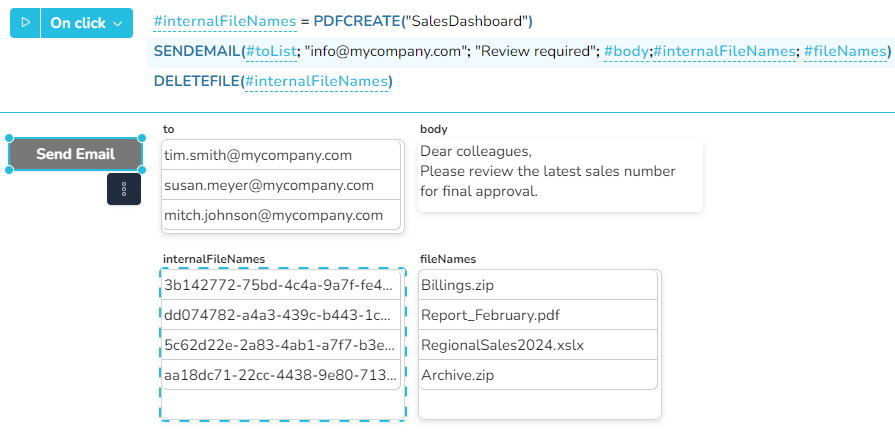
*Example 3* - As in example 2, but with four attachments to which suitable file names are assigned.