> For the complete documentation index, see [llms.txt](https://docs.nedyx.com/llms.txt). Markdown versions of documentation pages are available by appending `.md` to page URLs; this page is available as [Markdown](https://docs.nedyx.com/version-1.52-de-preview/mit-nedyx-arbeiten/widgets.md).
# Widgets
Seiten sind mit Widgets gefüllt. Es gibt verschiedene Widget-Typen und -Untertypen:
* Tabellen-Widget
* Column
* Row
* Hierarchy
* Zellen-Widget
* Text-Widget
* Button-Widget
* Menu-Widget
* Hierarchy Menu
* Chart-Widget
* Image-Widget
Widgets werden über die Widget-Symbolleiste zu einer Seite hinzugefügt.
Ein einfacher Klick platziert ein neues Widget des gewählten Typs in der Mitte der aktuellen Seite. Alternativ kann ein Widget auch per Drag\&Drop an eine bestimmte Stelle auf der Seite gezogen werden.
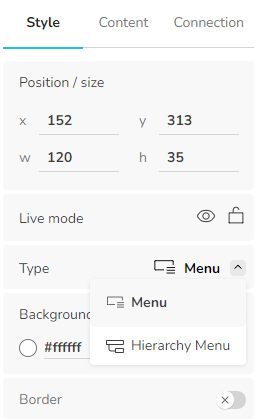
Die Untertypen "Hierarchie" (für Tabellen-Widgets) und "Hierarchie-Menü" (für Menü-Widgets) können auf der Registerkarte Stile ausgewählt werden: