> For the complete documentation index, see [llms.txt](https://docs.nedyx.com/llms.txt). Markdown versions of documentation pages are available by appending `.md` to page URLs; this page is available as [Markdown](https://docs.nedyx.com/version-1.52-de-preview/clearlines-funktionen/text-funktionen/htmltojsontext.md).
# HTMLTOJSONTEXT
Konvertiert einen html-Text in einen json-Text, der formatierten Text-Widgets zugewiesen werden kann.
#### Syntax
**HTMLTOJSONTEXT**(*htmlText*)
* *htmlText* - html-formatierter Text, der in das json-Format umgewandelt werden soll, der in einem Text-Widget verwendet werden kann - ***Wertetyp**: Text*
#### Bemerkungen
* Wenn es nicht möglich ist, *htmlText* in json zu konvertieren, gibt die Funktion den htmlText als unformatierten Text zurück (siehe Beispiel 3 unten).
#### Beispiele
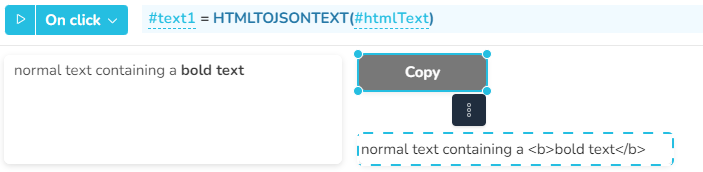
In diesem Beispiel wandelt ein Klick auf die Schaltfläche *Copy* den html-Text aus dem gestrichelten Widget in einen json-Text um, indem die Funktion HTMLTOJSONTEXT verwendet wird. Das Ergebnis wird dann dem Textwidget auf der linken Seite zugewiesen, wo es als formatierter Text angezeigt wird.