> For the complete documentation index, see [llms.txt](https://docs.nedyx.com/llms.txt). Markdown versions of documentation pages are available by appending `.md` to page URLs; this page is available as [Markdown](https://docs.nedyx.com/version-1.52-de-preview/clearlines-funktionen/bereichs-funktionen/combine.md).
# COMBINE
Gibt die Kombination von zwei oder mehr Bereichen zurück.
#### Syntax
**COMBINE**(*range1*; *range2*; …; *rangeN*; *orientation*)
* *range1-N* - die Bereiche, die miteinander verknüpft werden sollen - ***Wertetyp**: Bereich*
* *orientation* - die Ausrichtung, in der die Verknüpfung vorgenommen werden soll - ***Wertetyp**: Konstante (optional, Standardwert: horizontal).* Mögliche Werte sind:
* *horizontal* - die Bereiche werden horizontal verknüpft
* *vertical* -die Bereiche werden vertikal verknüpft
#### Bemerkungen
* Bei horizontaler Ausrichtung wird die Gesamtzahl der Zeilen durch den Bereich definiert, der die maximale Anzahl von Zeilen für alle Bereiche enthält. Bei vertikaler Ausrichtung analog.
* Wenn ein Bereich leer ist, wird er nicht für die Kombination verwendet (auch nicht als leere Zeile oder Spalte).
#### Beispiel
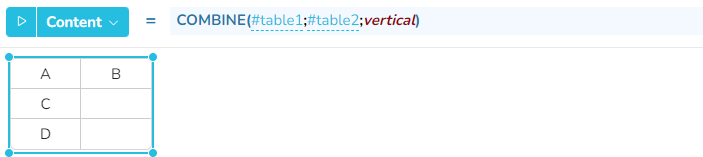
In den beiden folgenden Beispielen werden table1 und table2 horizontal (Standardeinstellung) und vertikal kombiniert.